How to Deposit Money
X777 Game offers fast, secure, and instant deposit options for players in Pakistan. Deposit chips instantly to get extra recharge bonuses.
Supported Payment Methods
Step-by-Step Deposit Guide
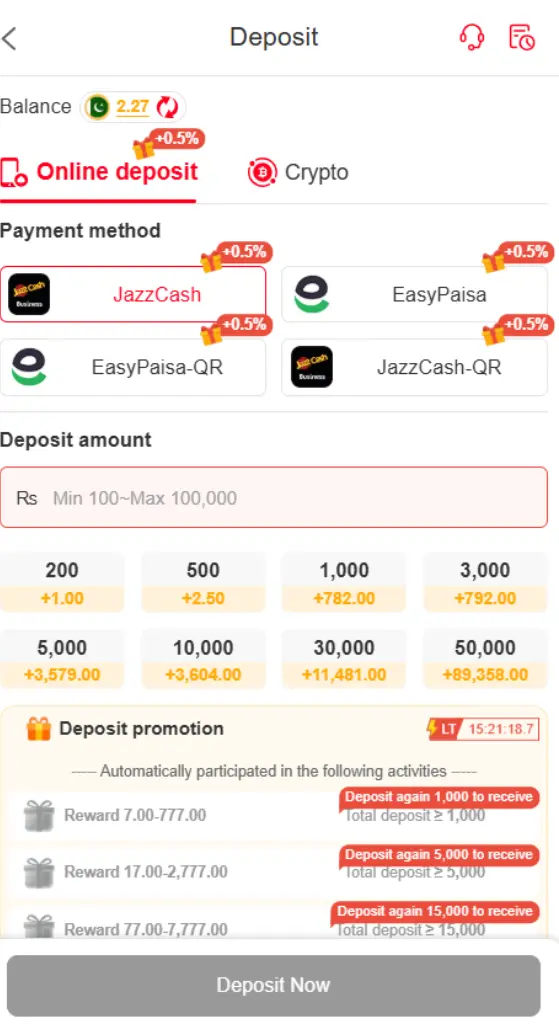
The X777 Deposit section shown in the screenshots provides a dedicated area for adding funds to an X777 account. The interface includes separate options for Online Deposit and Crypto, allowing users to select the payment method displayed on their account.
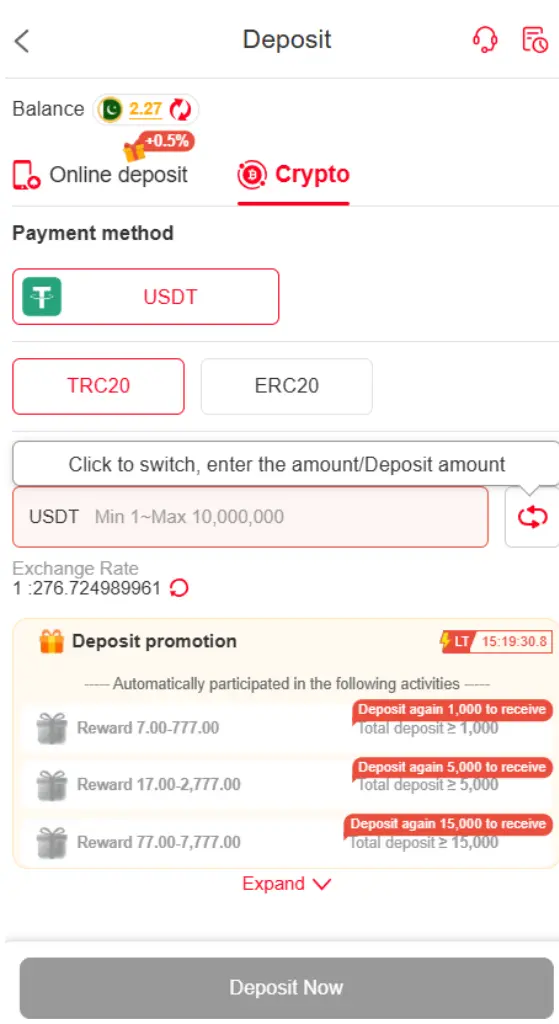
The screenshots show JazzCash, EasyPaisa, EasyPaisa QR, and JazzCash QR under the online payment section. The crypto section displays USDT with network options including TRC20 and ERC20.
X777 Deposit Methods
The X777 Deposit page shown in the screenshots includes different payment options. Under the online deposit section, users can see:
- JazzCash
- EasyPaisa
- EasyPaisa QR
- JazzCash QR
For cryptocurrency deposits, the screenshot shows USDT as the available cryptocurrency option.
Payment methods, limits, and promotional conditions can change, so users should always check the information displayed on the current X777 Deposit page.
How to Deposit on X777
Step 1: Open the Deposit Section
Log in to your X777 account and open the Deposit section from the mobile navigation.
Step 2: Select a Payment Method
Choose the payment method displayed on the Deposit page. The screenshots show JazzCash, EasyPaisa, QR payment options, and USDT.
Step 3: Enter Deposit Amount
Enter the amount you want to deposit in the Deposit Amount field. The screenshot also displays minimum and maximum amount information.
Step 4: Check Payment Details
Carefully review the payment information shown on the screen before continuing with the transaction.
Step 5: Complete the Payment
Follow the instructions provided for the selected payment method and complete the payment.
Step 6: Check Your Balance
After completing the transaction, check your X777 account balance to confirm whether the deposit has been credited.
X777 USDT Deposit
The screenshot also shows a separate Crypto deposit interface for USDT.
The available network options shown are:
- TRC20
- ERC20
When making a USDT deposit, select the network specified by the X777 deposit page and carefully verify the receiving address before sending funds.
X777 Deposit Promotion
The Deposit page shown in the screenshots also contains a Deposit Promotion section. It displays reward-related information connected with different deposit amounts and activities.
Users should read the current promotion details and conditions before making a deposit because promotional requirements can change.
X777 Deposit Security Tips
Before making an X777 Deposit, check the payment details carefully. For JazzCash, EasyPaisa, QR payments, or USDT, make sure the destination information matches the instructions shown on the current Deposit page.
For USDT transactions, selecting the wrong network can cause transaction problems. Always check whether the required network is TRC20 or ERC20 before confirming the transfer.
Never share your password, withdrawal password, verification information, or other sensitive account details with an unknown person.
X777 Deposit FAQs
Which payment methods are shown on X777?
The screenshots show JazzCash, EasyPaisa, EasyPaisa QR, JazzCash QR, and USDT.
Does X777 support USDT Deposit?
Yes. The screenshot shows a Crypto section with USDT and TRC20/ERC20 network options.
Where can I find X777 Deposit?
The Deposit option is available through the X777 mobile interface and bottom navigation.
Can the deposit limits change?
Yes. The current Deposit page should be checked for the latest minimum, maximum, payment methods, and applicable conditions.
Conclusion
The X777 Deposit interface shown in the screenshots provides Online Deposit and Crypto options. JazzCash, EasyPaisa, QR payment methods, and USDT are visible, while the USDT section provides TRC20 and ERC20 network choices. Users should carefully verify the payment information, deposit amount, and applicable conditions before completing a transaction.